
Endpoint
Use the following endpoint to connect a user to a NOX-integrated energy supplier: Create manufacturer link sessionAuthentication flow
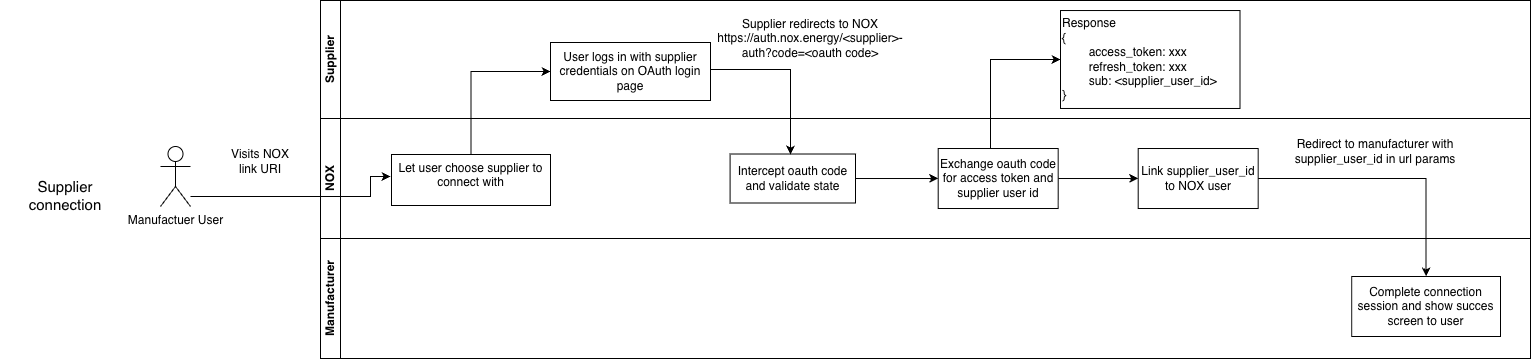
Summary:- Call our API → Creates an authentication session; you redirect the user to the
link_url. - User chooses supplier → NOX Energy opens an energy supplier selector page.
- User authenticates → The user authenticates with the supplier’s OAuth login page and is then redirected to the callback URL you provided to our API.
- Done! → NOX Energy has a
user_id/partner_user_idtosupplier_user_idmapping. If NOX Energy is integrated with both the supplier and your platform, user preferences (like comfort temperature bounds) are kept in sync between all parties.
- Present your terms and conditions for the user to accept.
- Authenticate the user against your own systems.
- On success, share the
supplier_user_idwith NOX Energy via thePOST /post-login-redirectendpoint.
user_id to your supplier_user_id, so you can link devices coming from the NOX Energy or manufacturer app to your own users.
Note:
- An authentication session can only last 15 minutes. If the session times out, the authentication will fail even if the user completes it afterwards.
Redirect user
After a successful redirect to the NOX Energy platform, the user is redirected back to the NOX Energy or manufacturer’s website/app through the redirect URL created at the start of the authentication process. This confirms to the user that the supplier authentication succeeded.The exact shape of the redirect callback payload for this flow (analogous to the
?data= parameter in the energy supplier flow) is not final yet. Confirm with NOX Energy on the progress and interest in this flow if you want to use it.- An authentication session can only last 15 minutes. If the session times out, the authentication will fail even if the user completes it afterwards.