
API Access
You will first need access to the NOX Energy API. To receive this, follow the Authentication guide.User creation process
1. User creation from the supplier’s website/app
1.1 Endpoint
Use the following endpoint to connect a user to our platform and link their asset: Create supplier link session1.2 Authentication flow
Summary:- Call our API → Creates an authentication session; you redirect the user to the
link_url. - User chooses brand → NOX Energy opens the brand-specific authentication page.
- User authenticates → The user is redirected to the callback URL you provided to our API.
- Done! → NOX Energy has a
user_id/device_idtosupplier_user_idmapping and data is available in our Package API endpoints.

user_id for the end-user, a redirect_url where NOX Energy will send the user after the flow, the asset_type of the device to connect, and optionally a language and brand to pre-select the Authenticator UI. This can be your mobile app or website. We use the user_id you provide to map the device with our internal nox user_id and device_id.
Choosing the device type (asset_type)
The required asset_type field tells NOX Energy which kind of device the user is connecting. It also determines which manufacturer brands are shown in the Authenticator UI. Supported values:
To connect a PV (solar) device, set
"asset_type": "pv". The user will then only see PV inverter brands. To connect a heat pump, set "asset_type": "hp". If you also pass a brand in the link-session request, then you will directly go to that brands connect page instead of first arriving to the brand selector page. This can be useful if you want to have your own style of brand selector within your app. Note that the provided brand must be a valid brand for the chosen asset_type. See the Supported Assets Overview for the full list of brands per category.
Example:
link_url field.
link_url from your website or app to start the manufacturer authentication flow.
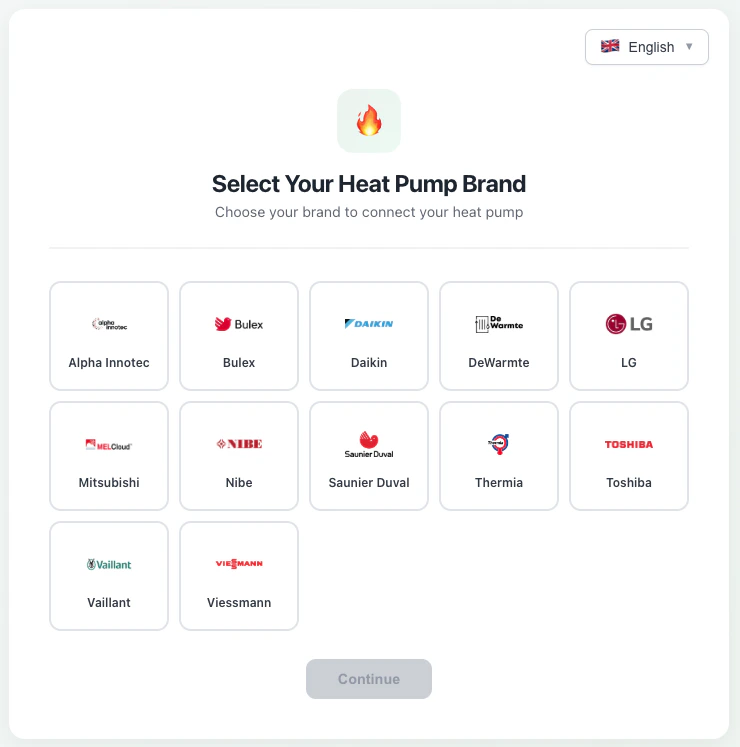
1.3 Redirect callback
To complete the integration flow, you must provide NOX Energy with a redirect URL (theredirect_url field in the request).
After the user successfully completes the authentication, they are redirected to this URL with query parameters containing the connection details, allowing you to map the NOX user to your system.
The redirect URL will contain a ?data= query parameter with a base64url-encoded (no padding) JSON payload:
Example decoded payload:
- A link session expires 10 minutes after creation. If the session times out, the authentication will fail even if the user completes it afterwards.
- If a user authenticates again with the same
supplier_user_id, we overwrite the linked device with the new one while keeping theuser_idandsupplier_user_idthe same. - If the owner of an asset authenticates using two different
supplier_user_idvalues, only the last user will exist on our side, as we assume a single user has ownership of a device. - After a device connects to our system for the first time, we need approximately 30 days of data before we can provide accurate steering capabilities.
2. User creation from the manufacturer’s or NOX Energy website/app
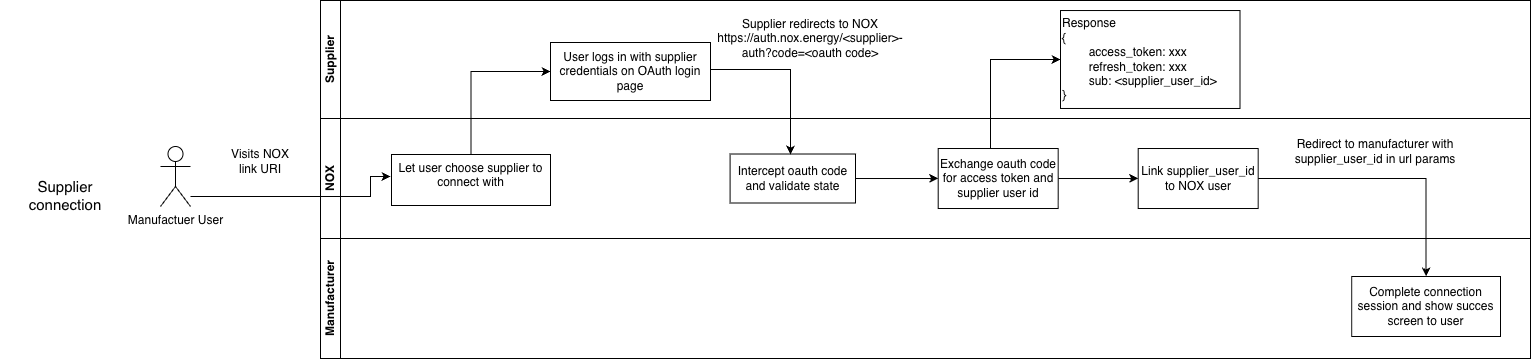
When a user enables NOX Energy optimizations from the NOX Energy web app or the manufacturer’s website/app, we redirect the user to an energy supplier selector where they can choose and authenticate with an integrated energy supplier (provided the supplier has an OAuth login page). This allows the energy supplier to know whichuser_id and device_id
are linked to which supplier_user_id.
Additionally, if NOX Energy is integrated with both the supplier and the manufacturer, we keep user preferences
like comfort temperature bounds in sync between all parties.
Below is an example flow diagram:
2.1 Supplier OAuth page
When the user selects their supplier, they are redirected to an OAuth login page that the supplier must provide. The supplier should configure a redirect URL from their OAuth platform back to NOX. The supplier’s OAuth page should also present the terms and conditions for the user to accept. On successful authentication, the supplier shares thesupplier_user_id via the NOX POST /post-login-redirect endpoint.
This allows NOX Energy to map the user_id to the supplier_user_id, so the supplier can link devices
coming from the NOX or manufacturer app to their users.
Note:
- An authentication session can only last 15 minutes. If the session times out, the authentication will fail even if the user completes it afterwards.