> ## Documentation Index
> Fetch the complete documentation index at: https://docs.nox.energy/llms.txt
> Use this file to discover all available pages before exploring further.
# OEM to Supplier Integration (BETA)
> Guide on how to integrate NOX Energy into your manufacturer website/app and connect users to an energy supplier.
This flow is currently in **BETA**. Details, like the endpoint url and payloads, may still change. Contact Nox Energy for more information regarding the progress and/or interest in this flow.
## Endpoint
Use the following endpoint to connect a user to a NOX-integrated energy supplier:
[Create manufacturer link session](/api-docs/manufacturer-integration/manufacturer/create-manufacturer-link-session)
## Authentication flow
**Summary**:
1. **Call our API** → Creates an authentication session; you redirect the user to the `link_url`.
2. **User chooses supplier** → NOX Energy opens an energy supplier selector page.
3. **User authenticates** → The user authenticates with the supplier's OAuth login page and is then redirected to the callback URL you provided to our API.
4. **Done!** → NOX Energy has a `user_id`/`partner_user_id` to `supplier_user_id` mapping. If NOX Energy is integrated with both the supplier and your platform, user preferences (like comfort temperature bounds) are kept in sync between all parties.
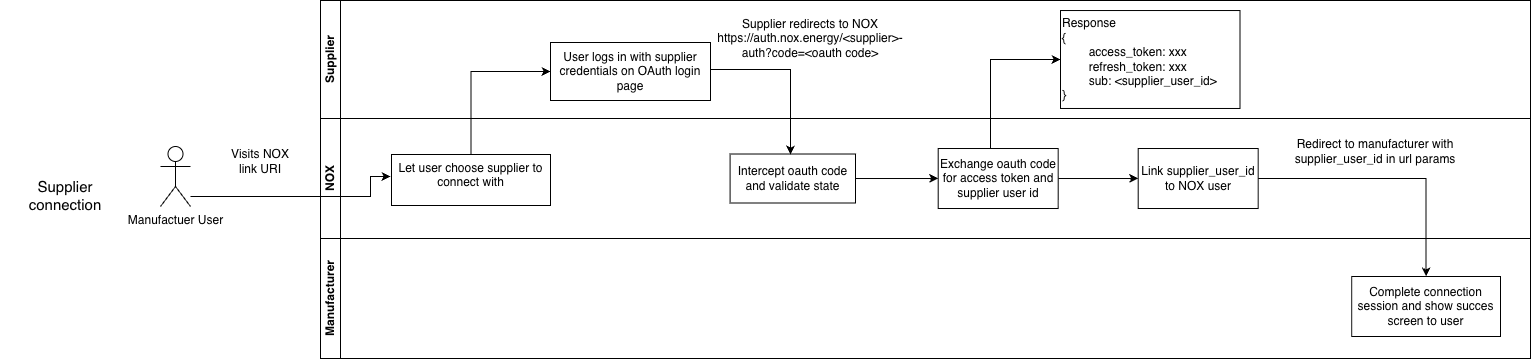 When a user selects your brand as their supplier, they are redirected to the OAuth login page you provide. Your OAuth page should:
* Present your terms and conditions for the user to accept.
* Authenticate the user against your own systems.
* On success, share the `supplier_user_id` with NOX Energy via the `POST /post-login-redirect` endpoint.
This allows NOX Energy to map its internal `user_id` to your `supplier_user_id`, so you can link devices coming from the NOX Energy or manufacturer app to your own users.
**Note**:
* An authentication session can only last 15 minutes. If the session times out, the authentication will fail even if the user completes it afterwards.
## Redirect user
After a successful redirect to the NOX Energy platform, the user is redirected back to the NOX Energy or manufacturer's website/app through the redirect URL created at the start of the authentication process. This confirms to the user that the supplier authentication succeeded.
The exact shape of the redirect callback payload for this flow (analogous to the `?data=` parameter in the energy supplier flow) is not final yet. Confirm with NOX Energy on the progress and interest in this flow if you want to use it.
**Note**:
* An authentication session can only last 15 minutes. If the session times out, the authentication will fail even if the user completes it afterwards.
When a user selects your brand as their supplier, they are redirected to the OAuth login page you provide. Your OAuth page should:
* Present your terms and conditions for the user to accept.
* Authenticate the user against your own systems.
* On success, share the `supplier_user_id` with NOX Energy via the `POST /post-login-redirect` endpoint.
This allows NOX Energy to map its internal `user_id` to your `supplier_user_id`, so you can link devices coming from the NOX Energy or manufacturer app to your own users.
**Note**:
* An authentication session can only last 15 minutes. If the session times out, the authentication will fail even if the user completes it afterwards.
## Redirect user
After a successful redirect to the NOX Energy platform, the user is redirected back to the NOX Energy or manufacturer's website/app through the redirect URL created at the start of the authentication process. This confirms to the user that the supplier authentication succeeded.
The exact shape of the redirect callback payload for this flow (analogous to the `?data=` parameter in the energy supplier flow) is not final yet. Confirm with NOX Energy on the progress and interest in this flow if you want to use it.
**Note**:
* An authentication session can only last 15 minutes. If the session times out, the authentication will fail even if the user completes it afterwards.